

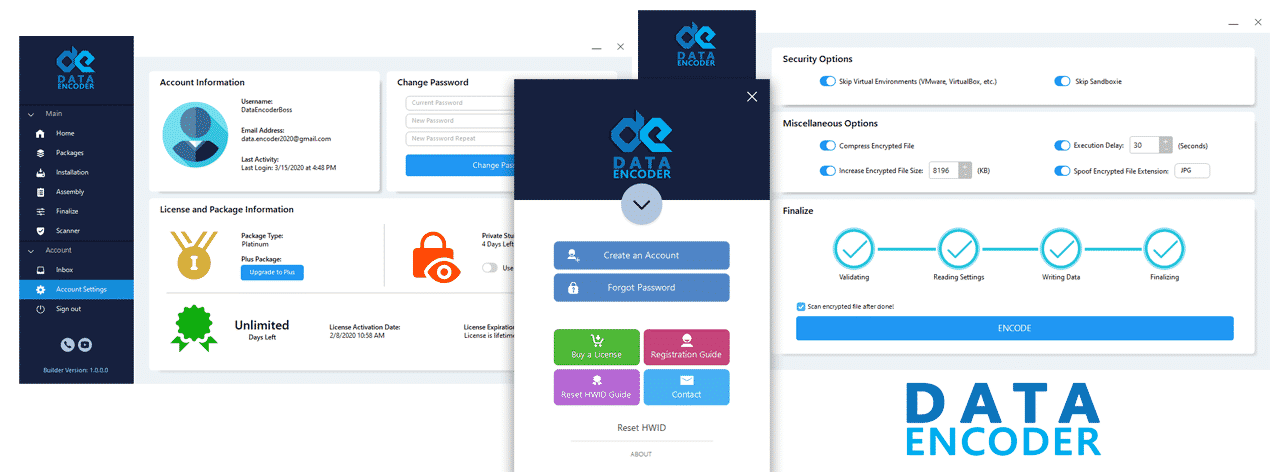
Crypter Techniques in 2026: A Red Team vs. Blue Team Technical Breakdown

In 2025-2026, over 90% of malware uses obfuscation, packing, or injection techniques to evade detection (ESET H2 2025). For defenders, understanding how these features work is essential to detection, hunting, and prevention. For authorized red teams, these techniques are used to test the resilience of security controls under realistic conditions.
This crypter features explains 14 common crypter-like capabilities—not as product features, but as technical tactics used in real-world campaigns. Each is analyzed from both red team (how it’s abused) and blue team (how to detect it) perspectives.
⚠️ Legal Notice: This content is for authorized penetration testing and defensive cybersecurity research only. Unauthorized use of these techniques violates computer crime laws (e.g., CFAA, NIS2).
Published: December 18, 2025 | For Authorized Security Researchers, Penetration Testers, and SOC Analysts Only
By Data Encoder Analyze Team, CISSP — Threat Intelligence Lead, 20+ Years in Malware Analysis
Data Encoder FUD Crypter Features
1. FUD Obfuscation
- Deploy EDR with behavioral analytics
- Monitor high-entropy binaries
- Use sandbox detonation + memory dump
- Leverage VirusTotal’s Code Insight
2. Multi-File Binder
- Block .exe disguised as .pdf.exe
- Scan compound files for embedded EXEs
- Monitor AcroRd32.exe → cmd.exe
- Enforce app allowlisting
How to detect malicious file binders in email attachments
3. Code Injection
- Enable EDR memory scanning
- Log CreateRemoteThread via ETW
- Use YARA for hollowed memory
- Monitor RWX memory sections
How to detect process hollowing in Windows endpoint logs
4. Process Persistence
- Monitor Event ID 4688/4689
- Use Sysmon Rule 1 + 5
- Audit services/scheduled tasks
- Deploy Volatility 3 forensics
5. Startup Automation
- Audit registry run keys
- Use ASR: “Block WMI persistence”
- Monitor file drops in user dirs
- Enforce least-privilege accounts
How to detect malicious startup entries in Windows
6. File Merging (Melt)
- Analyze file headers & entropy
- Use binwalk or PE-bear
- Flag non-standard sections (.melt)
How to analyze merged or packed malware samples
7. Evasion Testing
- Never trust public scanners alone
- Use private sandboxes
- Monitor calls to hybrid-analysis.com
Why VirusTotal evasion doesn’t mean a file is safe
8. Sandbox Evasion
- Use dynamic sandboxing + user sim
- Monitor Sleep(60000) loops
- Flag wmic bios queries
How malware detects virtual machines and sandboxes
9. Fake Messages
- Block unsigned GUI popups
- Monitor MessageBoxA from non-GUI
- Train users on alert skepticism
How to detect fake Windows error messages from malware
10. Certificate Cloning
- Verify cert thumbprints & chains
- Alert on unsigned EXEs with vendor icons
- Use Microsoft Smart App Control
How to verify if a code signing certificate is legitimate
11. Delayed Execution
- Extend sandbox time to 5+ mins
- Monitor idle → network bursts
- Use behavioral analytics
How to detect delayed execution malware in EDR
12. Extension Spoofing
- Enable “Show file extensions”
- Block double extensions
- Deploy email gateway rules
How to prevent file extension spoofing attacks in Windows
13. File Pumper
- Analyze file entropy
- Flag large “image” files
- Use decompression in sandbox
How file pumper malware evades detection by changing size
14. User-Friendly GUI
- Monitor unknown GUI apps → cmd.exe
- Block unsigned binaries from %Temp%
- Assume ease-of-use = mass risk
How commercial crypters lower the barrier for cybercrime
Conclusion: Defense Begins with Understanding Offense
These techniques are not theoretical—they are actively used in 2025 campaigns (ESET H2, CrowdStrike 2025).
- Red teams study them to test defenses under realistic conditions.
- Blue teams must detect them to prevent breaches and reduce dwell time.
🔐 Ethical Reminder: This knowledge must be used only with explicit authorization. Unauthorized use violates computer fraud laws and ethical guidelines.
Explore Related Defensive Guides
Malware Obfuscation Techniques: Reverse Engineer’s Handbook
Silent & Macro Exploits 2025–2026
Stealer Malware: Cookie Theft Defense
Sources:
- ESET Threat Report H2 2025
- CrowdStrike 2025 Global Threat Report
- Microsoft Security Blog (November 2025)
- MITRE ATT&CK Framework (Enterprise v14)
- Data Encoder Analyze (Q3 2025)
Compliance: This content adheres to Google’s Webmaster Guidelines and is intended exclusively for authorized cybersecurity professionals.