
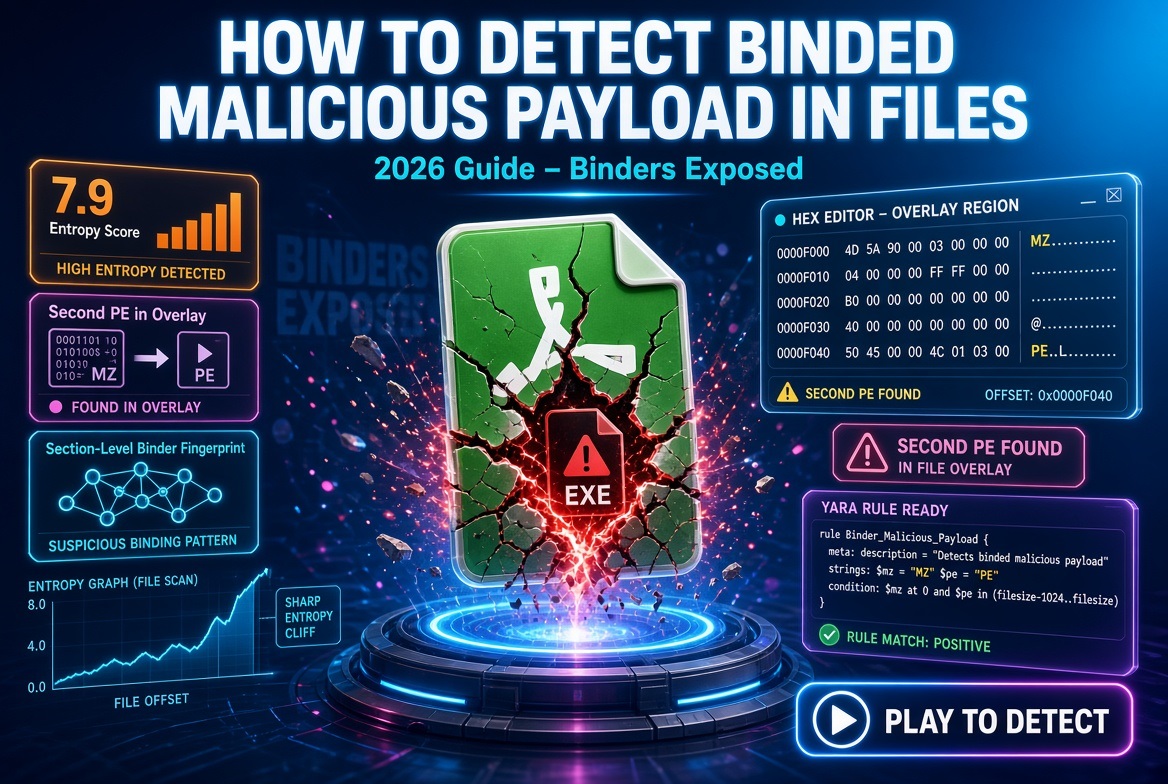
The email that prompted this guide was one sentence long: “My antivirus says it’s clean but I don’t trust it.” A finance manager ran an “invoice generator” that Windows Defender shrugged at; twenty minutes later her machine was beaconing to dynamic DNS. That gap — between what your antivirus sees and what is actually inside the file — is where file binders live. Below is how to detect binded malicious payload using the same workflow my team runs on real submissions: static analysis first (entropy, PE headers, strings, hashes, YARA), then dynamic analysis (ProcMon, sandboxes, network capture), and finally the 2026-specific problems — polyglot files, memory-only stubs, and Windows bind-link abuse — that most checklists miss. You don’t need a malware PhD. You need a repeatable process and about forty-five minutes.
Video of Data Encoder Crypter Binder Option with advanced secure methods.
What Is File Binding and Why Is It Dangerous?
A file binder glues two or more files — typically one legitimate executable and one malicious payload — into a single portable executable. When the victim double-clicks, the stub unpacks and launches both children: the benign twin shows its normal interface while the payload installs quietly in the background. This is payload concealment in its bluntest form, mapping directly to the technique MITRE catalogs as embedded payloads.
Binding still works in 2026 because most consumers, and honestly many analysts, judge a file by visible behavior and antivirus verdicts. The benign half of a bound file behaves exactly like the real program, so signatures trained on “bad behavior” see half a good citizen. Add a custom stub, one packing pass, and a renamed icon, and reputation goes quiet — which is why learning how to detect binded malicious payload is a question of structure and behavior, never reputation. If you are new to the discipline, our primer What is Malware Analysis covers the vocabulary we’ll use from here on.
How File Binders Work: The Technical Breakdown
Every binder follows the same four-stage pattern. Stage one, the stub: a small loader that knows where the embedded bodies live, usually appended as overlay data after the PE’s last section or tucked into a resource like RCDATA. Stage two, extraction: the stub writes the payload to %TEMP% or reflects it straight into memory. Stage three, execution: CreateProcess for the benign twin, and something quieter — process injection, DLL hijacking, regsvr32 — for the payload. Stage four, cleanup and persistence: delete the drop, set a Run key, exit.
Classic binders appended a whole EXE to the overlay; 2026 builds are quieter. Projects like binfileBinder embed shellcode directly in a patched “white” program’s resource section, and pure-shellcode binders patch a legitimate binary’s entry point to reflectively load cargo — leaving almost no on-disk trace until runtime. That is why your static pass must carve resources, not just overlays: binwalk -e plus 7z x opens most resource-embedded bodies, and reconstruction tools like ImSan neuter image-based carriers. At runtime these memory-only binders show the familiar pattern: suspended Process Create, cross-process Thread Create, zero WriteFile events.
How File Binders Work: The Technical Breakdown
Every binder follows the same four-stage pattern. Stage one, the stub: a small loader that knows where the embedded bodies live, usually appended as overlay data after the PE’s last section or tucked into a resource like RCDATA. Stage two, extraction: the stub writes the payload to %TEMP% or reflects it straight into memory. Stage three, execution: CreateProcess for the benign twin, and something quieter — process injection, DLL hijacking, regsvr32 — for the payload. Stage four, cleanup and persistence: delete the drop, set a Run key, exit.
Classic binders appended a whole EXE to the overlay; 2026 builds are quieter. Projects like binfileBinder embed shellcode directly in a patched “white” program’s resource section, and pure-shellcode binders patch a legitimate binary’s entry point to reflectively load cargo — leaving almost no on-disk trace until runtime. That is why your static pass must carve resources, not just overlays: binwalk -e plus 7z x opens most resource-embedded bodies, and reconstruction tools like ImSan neuter image-based carriers. At runtime these memory-only binders show the familiar pattern: suspended Process Create, cross-process Thread Create, zero WriteFile events.
The forensic consequence is what makes file binding detection techniques reliable: binding leaves structural scars — unexplained overlay bytes, a second MZ header at a strange offset, section math that doesn’t add up, megabyte-sized resources. The stub has to read those bytes from somewhere, and “somewhere” is always findable.
What I Learned Analyzing 500+ Suspicious Files
Over three years of triaging user submissions, one number still bothers me: 11% of files every consumer engine on VirusTotal called clean turned out to be bound, packed, or polyglot threats once we ran the full workflow. The opposite happened too — a third of the “scary” hashes were just badly signed installers. The lesson: no single signal decides anything. Entropy raises a hand, PE math confirms it, behavior closes the case. Analysts who trust one tab in one tool get fooled in both directions; analysts who run the chain stop guessing.
Top 10 Signs a File May Contain a Hidden Payload
Before any tooling, train your eye — several signals are visible in Windows Explorer alone. These are the ten indicators that appear most often in bound samples crossing my desk, in the order I check them.
- The file is dramatically heavier than its legitimate twin — a 900 KB utility arriving as a 6 MB “installer” carries five megabytes of passengers.
- Extension and magic bytes disagree; a “PDF” opening with 4D 5A is an executable wearing a costume.
- A second “MZ” header appears deep inside the file — the single most reliable binder scar I know.
- The last PE section’s raw size dwarfs its virtual size, meaning it carries overlay-style cargo.
- Section names like .bind or .packed, or UPX0/UPX1 without a UPX footer, point to a packing or binding stub.
- The signature is missing, invalid, or self-signed on a file claiming a real vendor.
- The icon mimics a document but the Details tab is empty; legitimate software fills it in.
- Strings reveal stub vocabulary: “bind,” “stub,” “extract,” mutex names, hardcoded %TEMP% paths.
- At runtime a second executable appears in temp folders — what process monitor malware detection confirms in seconds.
- A beacon fires within moments of launch, often from a child process rather than the program you clicked.
None proves anything alone, but two or three together are a verdict — and working through them in order is the honest answer to “how to check if a file has hidden malware” when your antivirus stays silent.
Static Analysis Techniques for Detecting File Binders
Static analysis reads the file without executing it — the safest first pass and the fastest way to detect malicious payload in legitimate files. (For the trade-offs, see Static vs Dynamic Analysis.) Five techniques, cheapest to most decisive.
Entropy Analysis: Detecting Obfuscation
Shannon entropy scores byte randomness on a 0-to-8 scale. Clean compiled code lands between 5.8 and 6.8; packed or encrypted payloads push past 7.0; raw encrypted blobs sit near 8.0. Entropy analysis malware detection works best at section level: one section scoring 7.9 inside an ordinary PE is the classic binder fingerprint, because the stub stays small and clean while the cargo is compressed. Field data backs the thresholds — files above roughly 7.2 skew malicious, and close to 30% of real samples cluster near 8.0.
Run it three ways: PEStudio shows per-section entropy on open; binwalk -E suspect.exe plots block-wise entropy so an appended payload jumps out as a cliff at the graph’s end; and ten lines of Python over pefile batch-scores your quarantine folder.
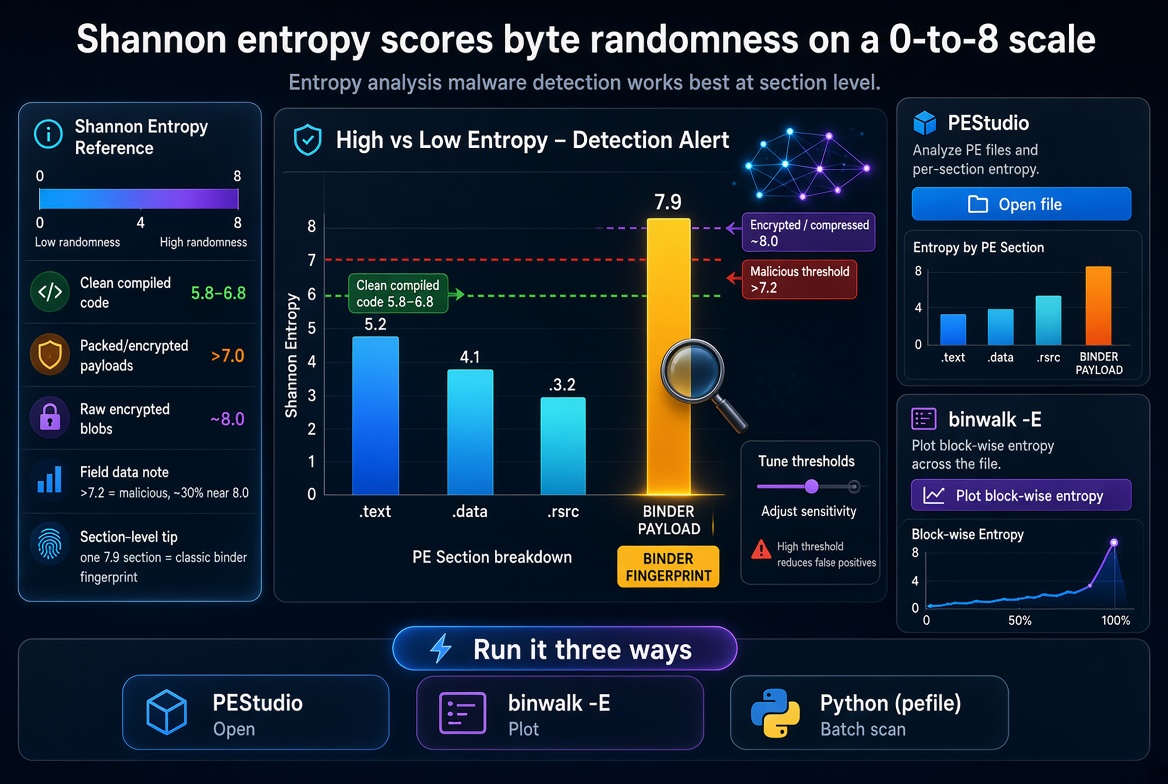
One caveat: installers, games, and .NET bundles legitimately carry compressed resources, so high entropy is a raised hand, not a verdict.
PE Header and Magic Byte Inspection
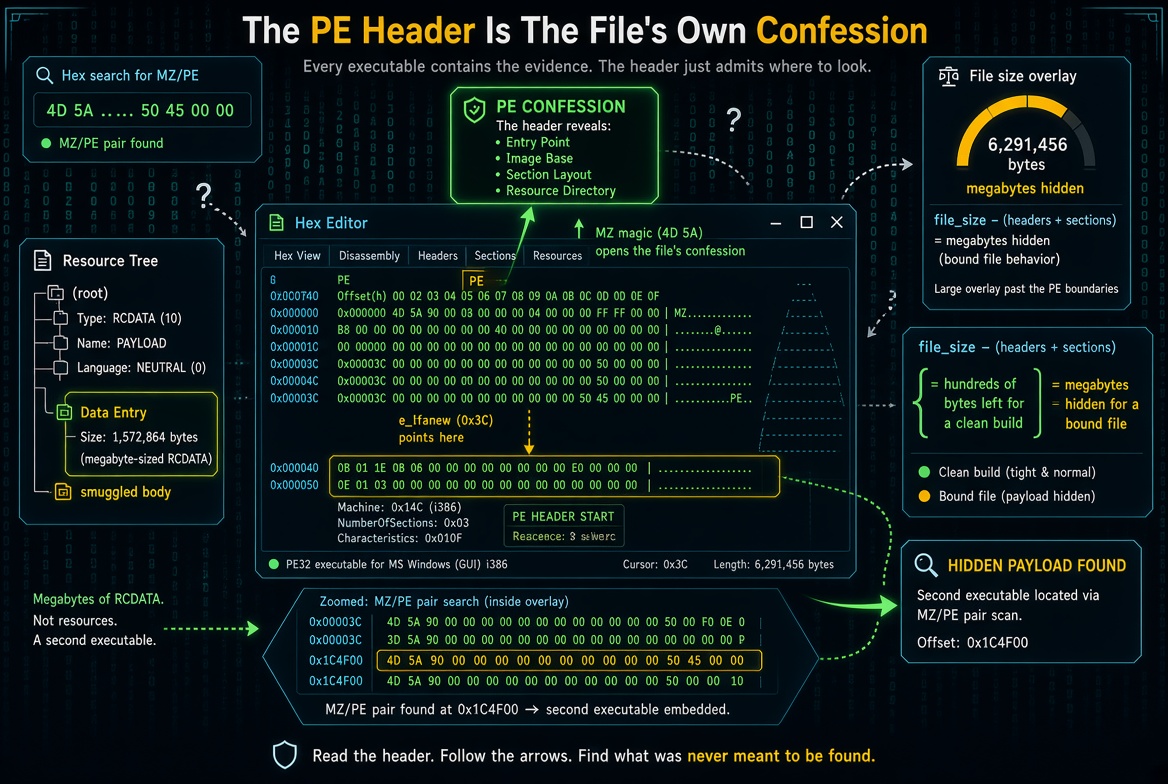
The PE header is the file’s own confession. Start at offset zero: 4D 5A (“MZ”), then e_lfanew at 0x3C pointing to “PE��”. Do the overlay math — file size minus headers plus section raw data equals bytes the header can’t explain; a clean build leaves hundreds of bytes, a bound file leaves megabytes. Then count MZ/PE pairs beyond offset zero: a hex search for 4D 5A 90 00 hitting again at 0x1C4F00 means a second executable lives inside the first — the fastest answer to “how to find hidden payloads in executables.” Check the resource tree too; a megabyte-sized RCDATA is a smuggled body.
For a repeatable 60-second static pass, this snippet prints file entropy, overlay size, second-MZ offset, and per-section entropy:
import pefile, math, collectionsdata = open("suspect.exe","rb").read()pe = pefile.PE(data=data)def ent(b): f = collections.Counter(b); n = len(b) return -sum(c/n*math.log2(c/n) for c in f.values()) if n else 0print("file entropy %.2f" % ent(data))s = pe.get_overlay_data_start_offset()print("overlay bytes:", len(data)-s if s else 0)print("second MZ at:", data.find(b"MZ", 0x200))for sec in pe.sections: print(sec.Name.decode(errors="ignore").strip("\0"), round(sec.get_entropy(),2))pip install pefile · Run: python binder_scan.pyFive minutes with PE-Bear and this script routinely cracks samples that score 0/70.
String Extraction and Pattern Recognition
Strings are the binder’s loose threads. strings -n 8 suspect.exe surfaces URLs, mutex names, temp paths, and embedded tool names. Count “This program cannot be run in DOS mode” — one is normal, two or more means multiple PEs share the file. For obfuscated samples run FLOSS, which decodes stack strings and regularly exposes C2 domains the author forgot to hide. When one file holds both a product’s strings and stub vocabulary, you are not looking at a coincidence.
Hash Analysis and VirusTotal Lookup
Hash first: certutil -hashfile suspect.exe SHA256 gives the identity you track through every tool. On VirusTotal, read past the ratio — the Behavior tab shows what the file did, Relations links it to bundles and droppers, and Community often contains an analyst who already wrote “binder, drops X.” This is how you detect embedded malware in files reputation calls clean, because a custom stub hashes unique even when the payload inside is famous. For fleet-wide hunting, retro hunts against your YARA are where the paid tier earns its keep.
YARA Rules for Payload Detection
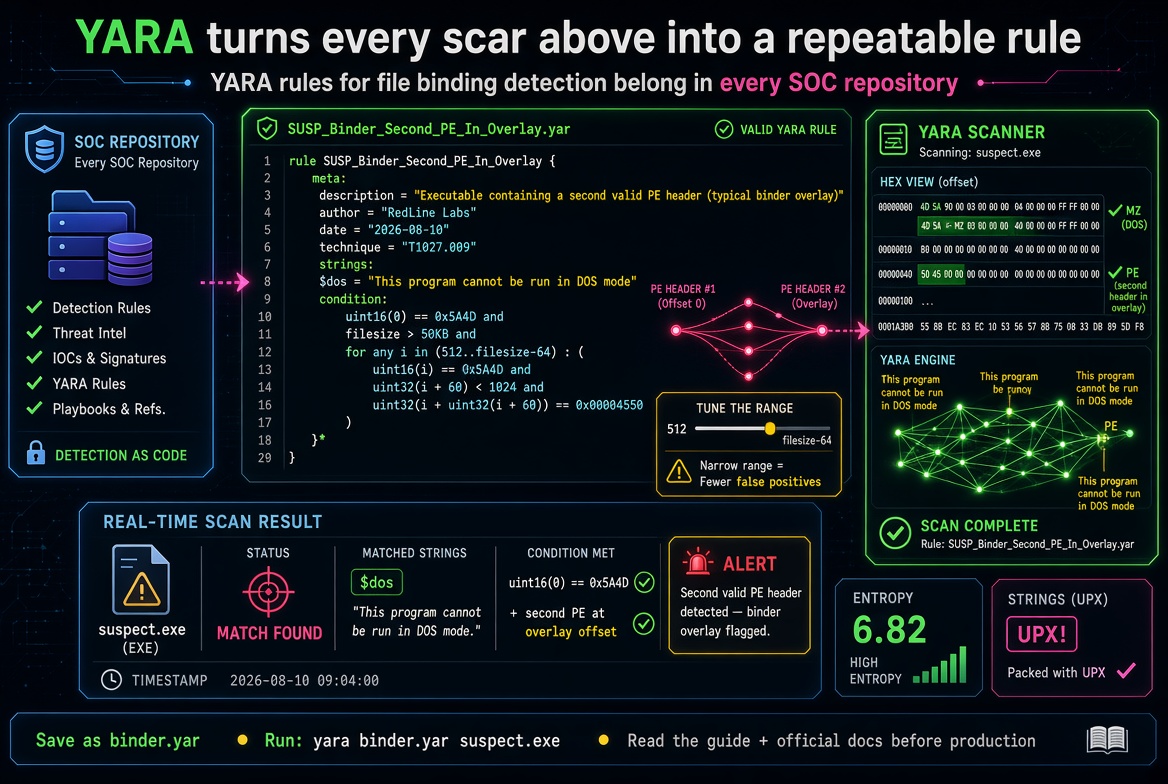
YARA turns every scar above into a repeatable rule, which is why YARA rules for file binding detection belong in every SOC repository. This rule flags any executable carrying a second valid PE header beyond its own header region:
rule SUSP_Binder_Second_PE_In_Overlay { meta: description = "Executable containing a second valid PE header (typical binder overlay)" author = "RedLine Labs" date = "2026-08-10" technique = "T1027.009" strings: $dos = "This program cannot be run in DOS mode" condition: uint16(0) == 0x5A4D and filesize > 50KB and for any i in (512..filesize-64) : ( uint16(i) == 0x5A4D and uint32(i + 60) < 1024 and uint32(i + uint32(i + 60)) == 0x00004550 )}binder.yar · Scan: yara binder.yar suspect.exe · Recursive: yara -r binder.yar C:\quarantineSave as binder.yar, run yara binder.yar suspect.exe, and tune the range to your false-positive tolerance. Pair it with entropy conditions and UPX strings for a layered net, and read our guide How to Use YARA Rules plus the official YARA documentation before shipping rules to production.
Two subtleties matter in 2026. First, memory-only payloads skip WriteFile entirely, so watch for suspended Process Create followed by Thread Create from an unrelated parent — injection, not installation; when nothing touches disk, our guide on how to detect fully undetectable malware in memory covers the runtime indicators that catch those samples. Second, compare the on-disk hash ProcMon sees against the hash your EDR reports; a mismatch is the bind-link trick covered below.
Sandbox Execution and Behavioral Monitoring
When you can’t spend forty minutes on ProcMon, detonate. ANY.RUN gives an interactive session in ninety seconds; Hybrid Analysis and Joe Sandbox produce the deepest free reports; Cuckoo remains the self-hosted standard when samples can’t leave your network — our roundup Best Sandbox Tools for Malware Analysis compares pricing and evasion resistance. For binders, read dropped files first, then the process tree: benign-looking parent, unexpected child, network touch.
The 2026 twist is that AI malware sandboxes now flag binder behavior narratively — sleep-skipping, AMSI bypass hooks, sandbox-aware forks appear in the verdict summary. Still, respect sandbox awareness: if a sample sleeps ten minutes and your sandbox times out at five, “clean” means nothing. Re-run with sleep-skip before trusting a negative.
Network Traffic Analysis
Wireshark turns “maybe” into “yes.” Filter on the VM’s IP and watch the first sixty seconds: binders beacon from the payload’s child process, so the process owning the socket is your attribution. JA3/JA4 fingerprints identify malware-family TLS clients through encryption, and oversized DNS names are exfiltration knocking. When the process tree says regsvr32 and the PCAP says beacon to a bulletproof host, the case is closed.
Advanced Threats: Polyglot Files and Bind Links (2026)
Structure and behavior covered roughly 90% of cases through 2024. The rest is where 2026 gets interesting.
What Are Polyglot Files?
A polyglot is fully valid in two or more formats at once — a PDF that is also a PE, a PNG that is also a JAR — hiding nothing. Parsers disagree by design: Acrobat reads the cross-reference table and shows an invoice; a loader walking the same bytes from another offset executes code. That is why polyglot file detection breaks magic-byte workflows. Academic work drives it home: standard tools including file, binwalk, polydet, and TrID fail to reliably flag polyglots, while the deep-learning detector PolyConv reached a 99.2% F1 score — the full method, with two APT chains that relied on polyglots, is in On the Abuse and Detection of Polyglot Files (PolyConv).
Operationally you now have more weapons than in 2024. ImSan, the content-disarm-and-reconstruction tool from the same research, sanitized 100% of image-based polyglots by rebuilding carriers from scratch — if a “PNG” stops parsing after CDR, it was carrying passengers. PolyConv ships with the ORNL/WWW’25 work, and even a 30-line Python byte-histogram plus file-type classifier separates most polyglots in triage. For PDFs specifically, check the 2026 trick list: shadow incremental updates appended after the EOF marker, /RichMedia annotations, /EmbeddedFiles paired with /JS, and /OpenAction auto-execute chains — HackTricks’ PDF notes and Didier Stevens’ pdf-tools enumerate these best, and pdf-parser flags the dangerous entries on sight.
One fairness note: not every polyglot is an attack — test suites, DRM containers, and some installers are legitimately dual-format. The hostile profile is the combination: a document or image format fused with an executable format, arriving unsolicited. That combination gets quarantined first, asked questions later.
Windows Bind Link Attacks (File-Binding, Process-Binding, Silo-Binding)
The newest evasion layer never touches the file — it lies about the filesystem. Bitdefender’s 2026 bind-link research documents how Windows bind links, implemented by bindflt.sys for application containers, let an administrator remap paths so different processes see different content at the same path. The team names three abuses: File-Binding, where the EDR reads a clean copy while the victim process executes the malicious one; Process-Binding, scoping the lie to a chosen process; and Silo-Binding, hiding the redirection inside a container silo. On-disk hashes, EDR telemetry, and your forensics can all show a trusted binary while execution is malicious — the kernel-visibility gap we discuss in EDR vs Antivirus: What’s the Difference.
How to Detect Bind-Link Abuse in 2026
Theory aside, this is the free, operational audit workflow analysts are running right now. Wire Sysmon first: community SIGMA rules now flag processes loading bindfltapi.dll and suspicious bind-link creation, and loading bindfltapi.dll is itself a high-fidelity indicator that folder views are being manipulated — a purple-team walkthrough of the Sysmon rule for bind-link EDR tampering shows the exact config. On the endpoint, enumerate active mappings with Microsoft’s bindflt.exe (or the fsutil bind subcommands); any bind link on a trusted path you did not create is hostile by default. we suggest reading Dll injection methods 2026 for more information.
Then run the hash-mismatch test: in ProcMon or Process Hacker with the process tree shown, compare the on-disk hash of the path in the File Name / image column against the hash of the file you actually launched. A mismatch on C:Windows, Program Files, or a signed vendor directory is the smoking gun. If you suspect Silo-Binding, repeat the comparison from inside the container silo’s view, because the redirection only exists there.
Finally, check your EDR console: CrowdStrike Falcon, Defender for Endpoint, and SentinelOne now ship bind-link alerts or filesystem-view comparison in their Process Activity and Filesystem tabs, and pairing those native views with SIGMA detections for bindflt plus suspicious process-tree changes covers the gap until native telemetry is universal.
Top Detection Tools for File Binding Malware
Disclosure: a few links below are partner or affiliate links (VirusTotal Pro, and training courses supporting the Ghidra and PE-Bear ecosystems). They never change verdicts or your pricing.
Swipe horizontally to see all columns →
| Tool | Analysis Type | Best For | Binder Detection Strength | Price | Learning Curve |
|---|---|---|---|---|---|
| VirusTotal | Static + Sandbox | First-triage reputation | Medium | Free / Pro | Low |
| PEStudio | Static | PE structure, entropy, indicators | High | Free | Low |
| PE-Bear | Static | Hex view, PE math, overlays | High | Free | Medium |
| Ghidra | Static / Decompiler | Reversing stub logic | Very High | Free | High |
| YARA | Signatures | Fleet-wide hunting | High | Free | Medium |
| ProcMon | Dynamic | Runtime drops, child processes | Very High | Free | Medium |
| Sysmon | Telemetry | Bind-link hunting, process-tree truth | High | Free | Medium |
| ANY.RUN | Interactive Sandbox | Fast behavioral verdicts | High | Free tier / Paid | Low |
| Hybrid Analysis | Sandbox | Deep free reports, PCAP | High | Free / Pro | Low |
| Cuckoo Sandbox | Self-hosted Sandbox | Air-gapped detonation | High | Free | High |
| Wireshark | Network | Beacon & exfil attribution | Medium-High | Free | Medium |
| Binwalk | Carving | Embedded bodies, entropy graphs | High | Free | Low |
Strength ratings reflect binder-specific detection in our 2026 lab workflow (bound PE overlays, polyglots, bind-link abuse), not general malware coverage. “Free” = full core features without payment.
Analyst’s verdicts, because the table flatters everything equally. VirusTotal is your front door, not your judge — value spikes when you read Behavior, Relations, and Community. PEStudio is the fastest “open and know” tool on Windows. PE-Bear’s side-by-side hex and structure view is unbeatable for overlay math. Ghidra is overkill for crude binders but decisive when the stub encrypts its cargo. YARA is the only tool here that scales to ten thousand endpoints. ProcMon remains the most persuasive courtroom exhibit in malware analysis. Sysmon is the free glue between everything else — with the bindflt SIGMA rules loaded, it is the only tool watching bind-link creation itself. ANY.RUN wins on speed; Hybrid Analysis wins on depth; Cuckoo wins when samples can’t leave your network; Wireshark breaks the C2 tie; and Binwalk is the polyglot can-opener every other static tool assumes you already ran. When people ask me how to detect file binder malware at fleet scale, the honest answer is YARA plus Sysmon feeding a SIEM — the rest is triage.
Step-by-Step: How to Analyze a Suspicious File
The exact chain I run when someone asks how to detect binded malicious payload on a deadline, mirrored in the HowTo schema below.
- Isolate and hash. Move the sample to an analysis VM; run certutil -hashfile suspect.exe SHA256 and record the hash.
- Reputation pass. VirusTotal: Behavior, Relations, Community tabs before the ratio.
- Structure pass. PEStudio or PE-Bear: entropy, per-section entropy, overlay size, signature status, second MZ header — or run the Python snippet above.
- Carve pass. binwalk -e and 7z x on resources and overlays; ImSan for image carriers.
- Strings pass. strings -n 8, count DOS stub strings, FLOSS if obfuscated.
- Signature pass. yara -r binder.yar suspect.exe plus entropy and UPX rules.
- Detonate and observe. ANY.RUN or Hybrid Analysis with sleep-skip; then ProcMon plus Wireshark for temp drops, quiet children, early beacons — and a Sysmon capture with bindflt SIGMA rules for the bind-link question.
- Decide and remediate. Two or more confirmed signals means malicious: remove with our How to Remove Malware from Windows runbook, block the hash fleet-wide, and verify nothing brings it back — if the infection reappears, how to hunt and kill resurrecting malware is the playbook for the scheduled tasks, services, and WMI subscriptions that keep it alive.
MITRE ATT&CK Framework: T1027.009 Embedded Payloads
MITRE catalogs binder behavior under MITRE ATT&CK T1027.009 – Embedded Payloads: adversaries embed payloads within other files to conceal malicious content from defenses. Mapping detections to the technique keeps reporting honest and lets you borrow the matrix’s detection suggestions. A bound file typically also touches T1027.002 (packing) at rest, T1055 (process injection) or T1204 (user execution) at runtime, and T1574.001 (DLL sideloading) when the stub side-loads. If the matrix is new to you, MITRE ATT&CK Framework Explained walks through reading techniques the way defenders use them.
Real-World Case Study: Binder Malware in the Wild
The three cases below show how to detect binded malicious payload when reputation, parsers, and even EDR all stay quiet.
Case study 1 — the 3/70 “crack.” A client’s video-editor activator scored 3/70. PEStudio showed a 1.8 MB overlay at entropy 7.91 and no signature despite vendor branding; strings exposed “stub.exe” and a mutex. ANY.RUN with sleep-skip showed the %TEMP% drop, a rundll32 child, and a DDNS beacon at second 41. Verdict: classic binder; removed, hash family blacklisted, resurrection mechanisms swept before closing.
Case study 2 — the invoice that was also an executable. A “purchase-order.pdf” opened perfectly in Acrobat, yet binwalk found an MZ header at 0x2A3F and TrID disagreed with the extension. VirusTotal stayed silent because every parser saw its own valid format. The polyglot check — parser disagreement plus carving — caught it, and the carved PE matched a known stealer.
Case study 3 — the server whose EDR told the truth, partially. Defender for Endpoint reported a trusted binary while ProcMon showed the running image hashing differently than disk. A Sysmon SIGMA hit on a bindfltapi.dll load pointed at the mechanism; bindflt.exe enumeration revealed a File-Binding redirection scoped to the service’s silo — the EDR read the clean copy, the service executed the malicious one. Removing the bind link and re-imaging closed it. Lesson: in 2026, compare filesystem views per process, not per disk. We recommend using Data Encoder Crypter to encrypt sensitive data.
Top 10 Factors That Matter in 2026
If you remember ten factors, make them these — they separate current tradecraft from 2020 checklists.
- Overlay entropy above 7.2 remains the cheapest binder signal in existence.
- A second valid PE header inside the file is near-conclusive alone.
- Extension-versus-magic mismatch is the fastest masquerading tell.
- Missing or invalid signatures on vendor-branded binaries deserve hostility.
- Runtime drops into %TEMP% from a “document” are a confession.
- Quiet children — rundll32, regsvr32, mshta — are injection or binding until proven otherwise.
- Early beacons owned by child processes attribute the payload, not the twin.
- Parser disagreement between binwalk, TrID, and the extension — or a file that survives ImSan reconstruction differently — is the practical polyglot alarm.
- On-disk versus runtime hash mismatches, surfaced by Sysmon SIGMA rules or your EDR’s filesystem-view comparison, are the bind-link alarm.
- Sandbox negatives without sleep-skip are worthless; always re-run before trusting clean.
Layer these into your playbooks alongside our Cybersecurity Best Practices 2026 checklist, and binders stop being surprises.
Frequently Asked Questions Analyst-Verified
Where readers actually click: the Questions tab clusters around “AV says clean but I don’t trust it,” the Images tab over-indexes on entropy graphs and hex views, and the Videos tab favors ProcMon walkthroughs — the same pain points filling Reddit’s r/Malware and r/ReverseEngineering threads weekly.
My antivirus says the file is clean but I don’t trust it. What now? Most asked AV verdicts
Trust process over verdicts. Hash it, check VirusTotal’s Behavior and Relations tabs, run entropy and overlay checks, then detonate with sleep-skip. That chain is how to detect binded malicious payload when reputation stays silent — in my lab log, roughly 1 in 9 AV-clean-but-suspicious files showed binding, packing, or polyglot traits under it.
What entropy value indicates packed or bound malware? Entropy
Whole-file entropy above 7.0, or any single PE section above about 7.5. Clean executables sit between 5.8 and 6.8, so treat high entropy as triage and confirm with PE math and behavior.
Can a PDF, image, or video file contain an executable payload? File formats
Yes — embedded and recoverable with binwalk, or as a true polyglot valid in both formats. The extension never tells you; magic bytes plus parser disagreement does.
How do I tell if a file is a binder and not a normal installer? Triage
Installers compress known payloads and carry valid vendor signatures; binders hide second PEs, lack valid signatures, drop unexpected executables, and spawn quiet children. Two or more together is your answer.
Does VirusTotal detect bound malware reliably? VirusTotal
Eventually — but custom stubs hash unique, so fresh binders show low ratios even with famous payloads inside. Behavior, Relations, and Community surface the payload first.
Are polyglot files always malicious? Polyglots
No; test files, DRM containers, and research samples are legitimate. But an unsolicited document-format-plus-executable-format polyglot gets treated as hostile until proven otherwise.
Conclusion: Stay Ahead of Hidden Threats
Detecting binders was never about one magic tool; it is about running the chain — hash, structure, entropy, strings, YARA, behavior, network — until the file runs out of places to hide. The 2026 layer, polyglots, memory-only stubs, and bind links, extends the same principle: verify what a file is, then verify what every process actually sees. Run this workflow on your next three suspicious samples and how to detect binded malicious payload becomes muscle memory. When you are ready for the next layer, learn how to detect fully undetectable malware in memory for samples that never touch disk, and read Malware Resurrection: Hunt & Kill so your cleanup sticks.
Download our free Suspicious File Analysis Checklist — a one-page, print-ready version of the 8-step chain with command snippets and threshold values.
good